As a supplier of cell phone repeaters, I often get asked by customers, "How do I know if a cell phone repeater is working?" It's a valid question, and in this blog post, I'll share some practical ways to determine if your cell phone repeater is functioning as it should.
Understanding the Basics of a Cell Phone Repeater
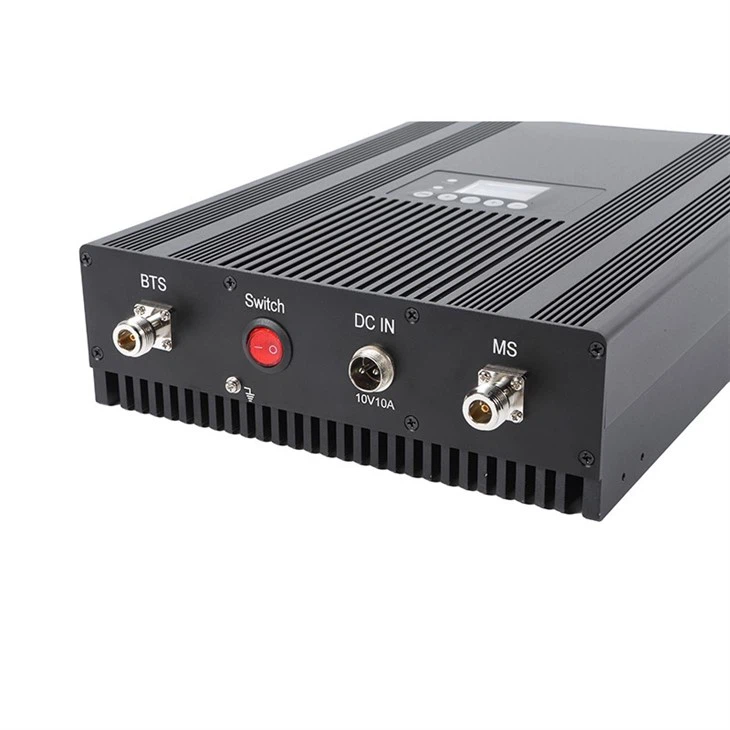
Before we dive into the testing methods, let's briefly understand what a cell phone repeater is. A cell phone repeater, also known as a Cell Phone Range Extender, is a device that amplifies the existing cell phone signal in an area. It consists of three main components: an outside antenna, an amplifier, and an inside antenna. The outside antenna captures the weak signal from the cell tower, the amplifier boosts the signal, and the inside antenna distributes the strengthened signal within the building or area.
Initial Installation Checks
The first step in ensuring that your cell phone repeater is working starts with the installation process. Here are some key checks during installation:
1. Antenna Placement
The outside antenna should be placed in a location with the strongest possible signal from the cell tower. This is usually on the roof or near a window facing the tower. The inside antenna should be placed in the area where you want to improve the signal, such as the center of a large room. Incorrect antenna placement can significantly affect the performance of the repeater.
2. Cable Connections
All cables connecting the outside antenna, amplifier, and inside antenna should be securely plugged in. Loose or damaged cables can cause signal loss or prevent the repeater from working altogether. Check for any visible signs of damage, such as cuts or frayed ends, and replace the cables if necessary.
3. Power Supply
Ensure that the amplifier is properly connected to a power source and that the power indicator light on the amplifier is on. If the light is not on, check the power cord and the outlet to make sure they are working.
Testing the Signal Strength
Once the repeater is installed, you can start testing the signal strength to determine if it's working.
1. Using Your Cell Phone
The simplest way to test the signal strength is to use your cell phone. Before turning on the repeater, check the signal bars on your phone in the area where you want to improve the signal. Then, turn on the repeater and wait a few minutes for it to stabilize. Check the signal bars again. You should notice an increase in the number of bars, indicating that the repeater is boosting the signal.
It's important to note that different cell phone models may display signal bars differently, so it's a good idea to use multiple phones for a more accurate assessment.

2. Signal Meter Apps
There are several signal meter apps available for both Android and iOS devices. These apps provide a more detailed measurement of the signal strength in terms of decibels (dBm). A higher dBm value indicates a stronger signal.
To use a signal meter app, open the app and follow the instructions to measure the signal strength. Take readings before and after turning on the repeater. If the repeater is working, you should see an improvement in the dBm value.
3. Professional Signal Testing Equipment
For a more accurate and comprehensive assessment, you can use professional signal testing equipment. These devices can measure various aspects of the cell phone signal, including signal strength, frequency, and bandwidth.
However, professional signal testing equipment can be expensive and may require some technical knowledge to operate. If you're unsure how to use the equipment, you can hire a professional technician to perform the testing for you.
Checking for Call Quality and Data Speed
In addition to signal strength, call quality and data speed are also important indicators of a working cell phone repeater.
1. Call Quality
Make a test call in the area where the repeater is installed. Pay attention to the clarity of the call, the absence of static or interference, and the ability to hear and be heard clearly. If the call quality has improved compared to before the repeater was installed, it's a good sign that the repeater is working.
2. Data Speed
Test the data speed on your cell phone by opening a web page or streaming a video. You can also use a speed test app to measure the download and upload speeds. Compare the data speeds before and after turning on the repeater. If the speeds have increased, it indicates that the repeater is enhancing the data signal.
Troubleshooting Common Issues
If you're not seeing an improvement in the signal strength, call quality, or data speed after installing the repeater, there may be some issues that need to be addressed.
1. Interference
Interference from other electronic devices or nearby cell towers can affect the performance of the repeater. Try moving the outside antenna to a different location or adjusting its orientation to reduce interference.
2. Incorrect Settings
Make sure that the amplifier is set to the correct frequency band for your cell carrier. Different carriers use different frequency bands, and using the wrong band can result in poor performance.
3. Device Malfunction
If all else fails, there may be a problem with the repeater itself. Contact the manufacturer's customer support for troubleshooting assistance or to arrange for a replacement if necessary.
Conclusion
Determining if a cell phone repeater is working involves a combination of installation checks, signal strength testing, and assessment of call quality and data speed. By following the steps outlined in this blog post, you can ensure that your Home Cell Signal Booster or Cell Signal Booster is functioning properly and providing the improved cell phone coverage you need.
If you have any further questions or need assistance with choosing the right cell phone repeater for your needs, please don't hesitate to contact us. We're here to help you find the best solution for your cell phone signal problems.
References
- Cellular Telecommunications Industry Association (CTIA). (n.d.). Understanding Cell Phone Signal Boosters. Retrieved from [CTIA Website]
- Federal Communications Commission (FCC). (n.d.). Rules and Regulations for Cell Phone Signal Boosters. Retrieved from [FCC Website]